

Overview
watsonx Orchestrate is IBM's multi-agent orchestration platform. Agent Builder is its core experience—a no-code interface that lets business users build AI agents, connect them to tools and workflows, and deploy them across HR, sales, procurement, and customer care.
The platform bridges two worlds: a developer-focused ADK for code-first builders, and the visual Agent Builder for everyone else. My background as a former software developer let me translate complex agentic architecture into UI patterns non-technical users could master in minutes.
We shipped 0→1 in 6 months, launching at IBM THINK 2025 in the CEO and GM keynotes.
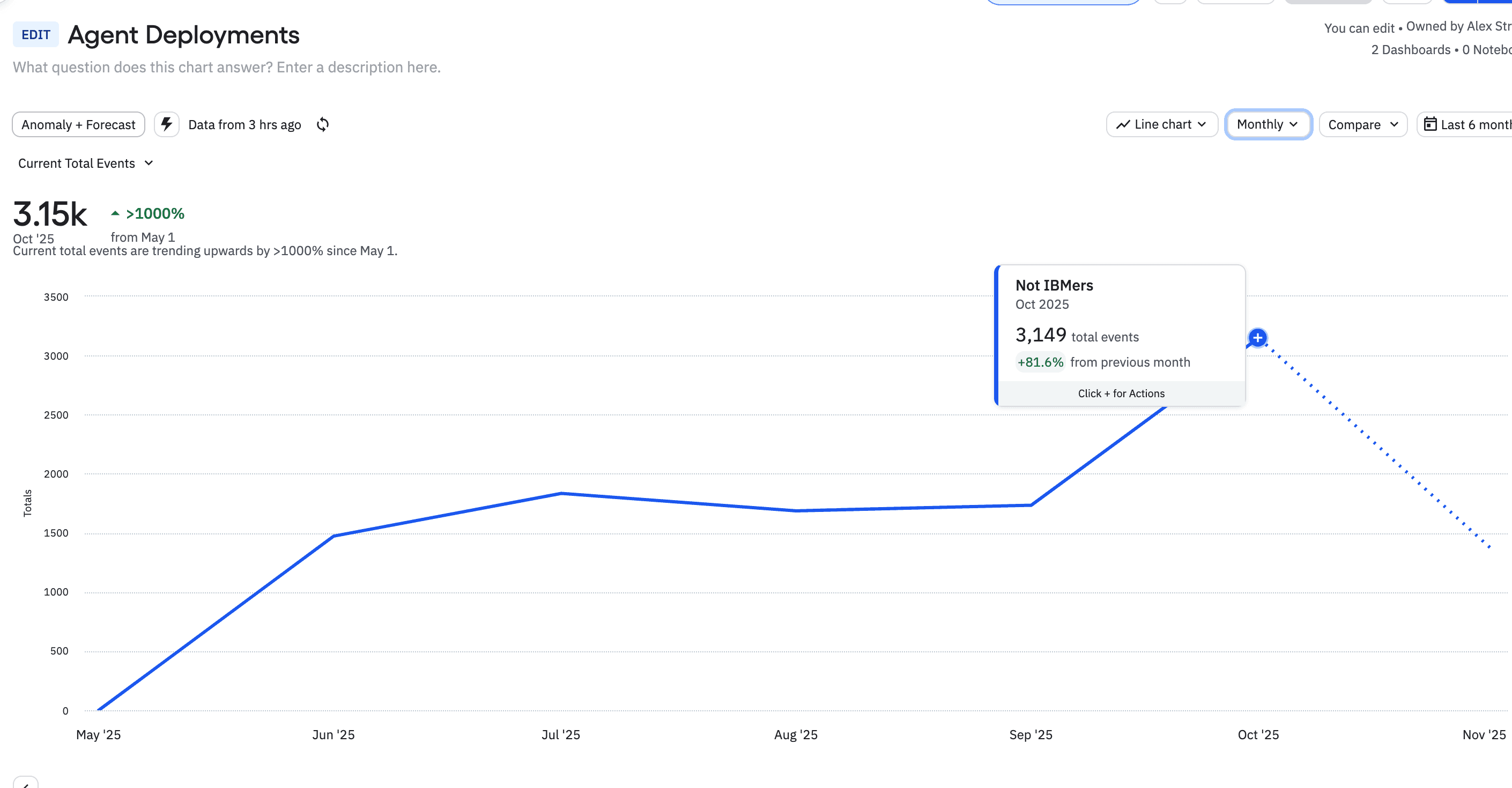
>1000%
Agent deployment growth since launch
8000+
Monthly active users building agents
<4 mins
Average agent creation time-to-value
$150M
Recognized revenue in Q3 2025
AI Agent Builder launch announcement at IBM THINK 2025
What was broken?
Three products. One Frankenstein.
Automation + Assistant + Orchestrate duct-taped together
60% never deployed
Users abandoned, no guidance, total overwhelm
$300M retention risk
5 major clients wanted agents, refused to migrate
"No-code" requiring developers
Pro-code disguised as simplicity
Weeks to configure basics
Every domain needed months of custom implementation
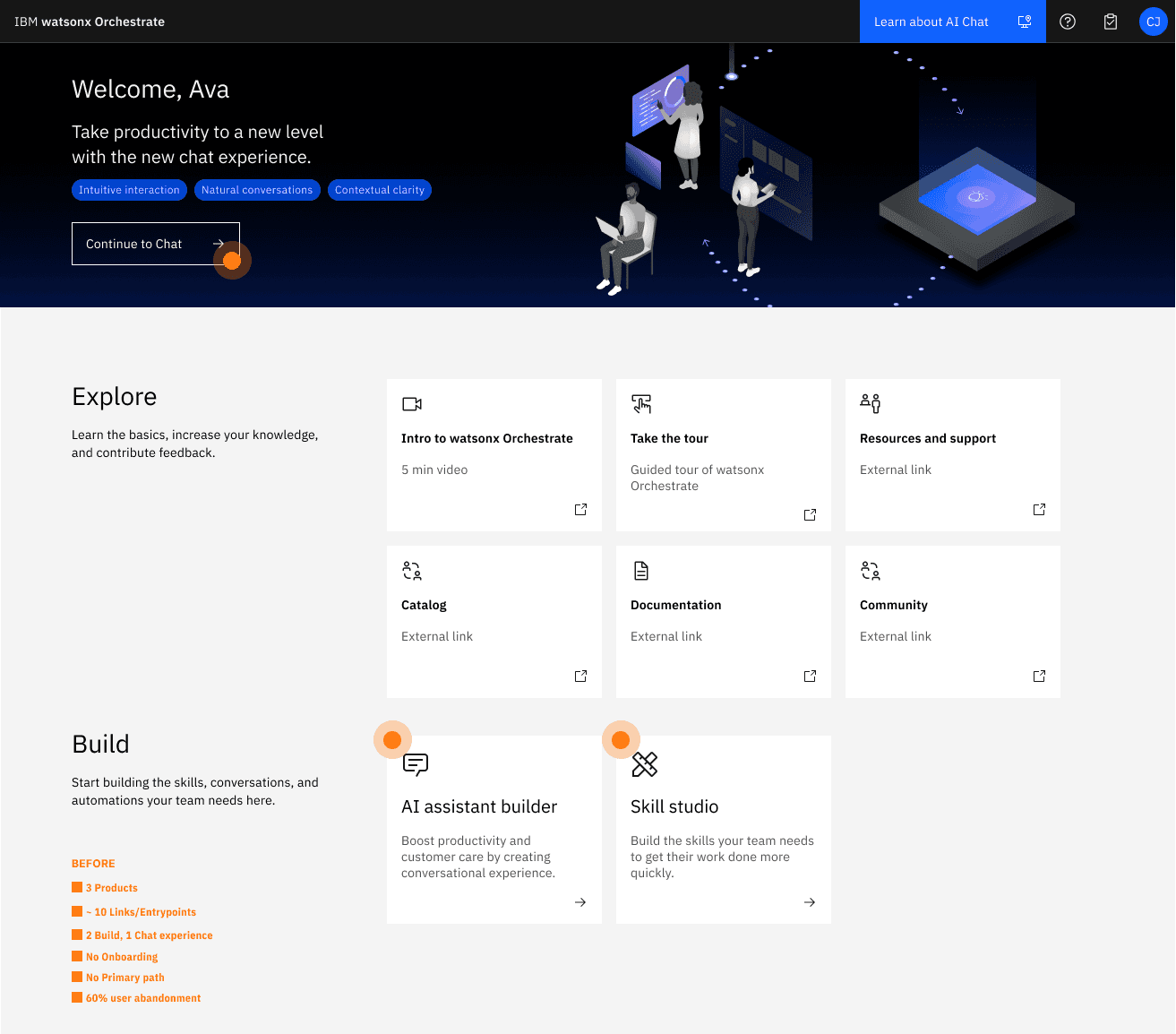
What user knew (Watson Assistant)
What we were building (Agent Builder)
Linear, deterministic flows
Non-linear graphs with state
One assistant at a time
Multi-agent orchestration
"If user says X, respond Y"
"Agent decides based on context"
Build → Test → Deploy (sequential)
Configure pieces that interact dynamically
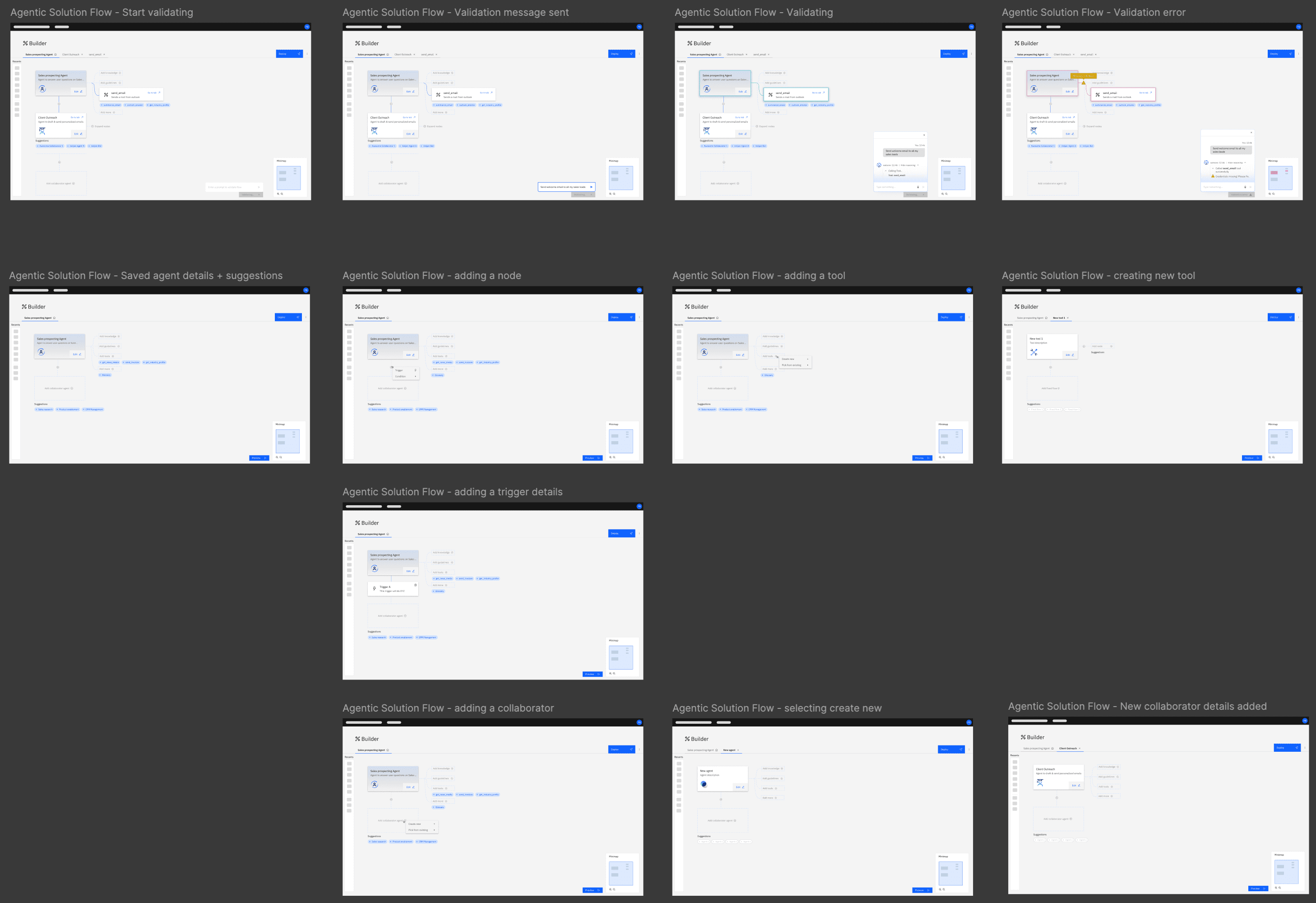
The Exploration
Three approaches. Two rejections. One insight.
1
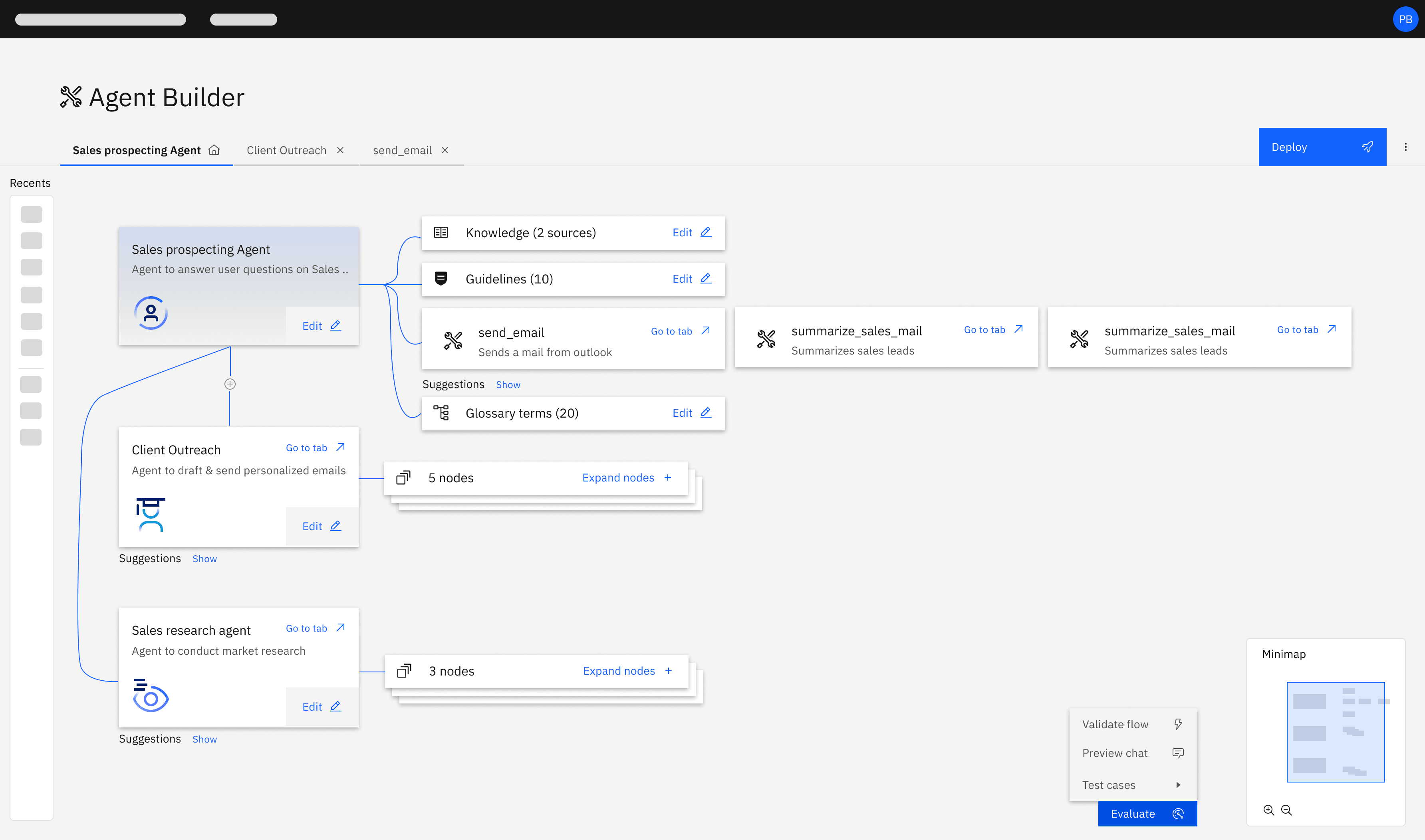
Node-Based Canvas: Rejected ❌
I explored a visual canvas matching LangGraph's architecture—nodes, edges, drag-and-drop. Competitors were doing it. It felt architecturally honest.
I rejected it after user tests. Users froze. The empty canvas problem paralyzed them. HR managers didn't know where to start.
I saw merit in visualizing agent relationships, but shelved it for post-MVP. The 2026 Canvas Builder roadmap revisits this.
2
Rigid Stepper Wizard: Rejected ❌
I swung the opposite direction. Step 1 → Step 2 → Step 3 → … → Done. Maximum guidance.
I rejected it too. Too rigid. Users couldn't jump back to test. Couldn't iterate in realtime. Worst of all, it lied about how agents actually work—they're not linear.
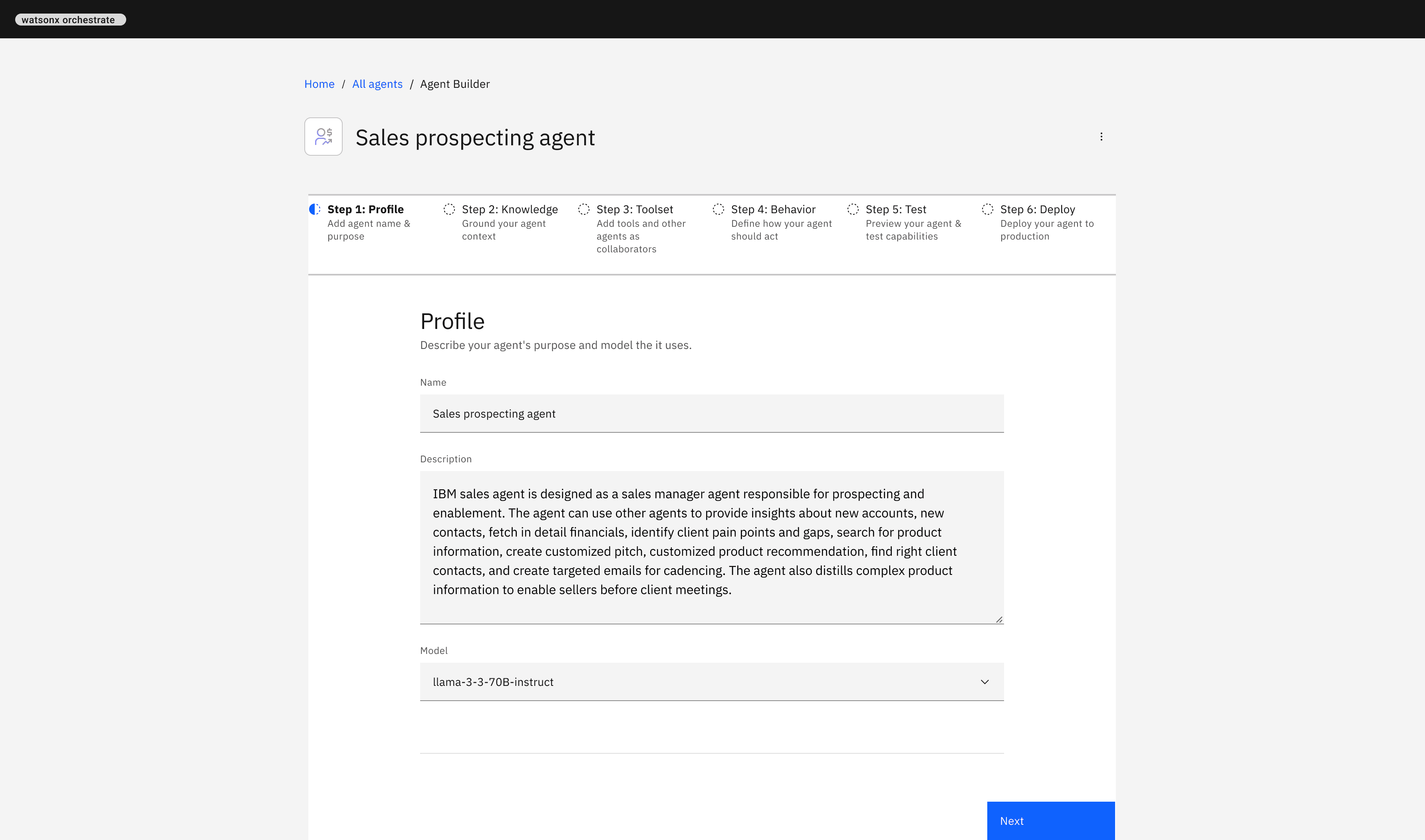
3
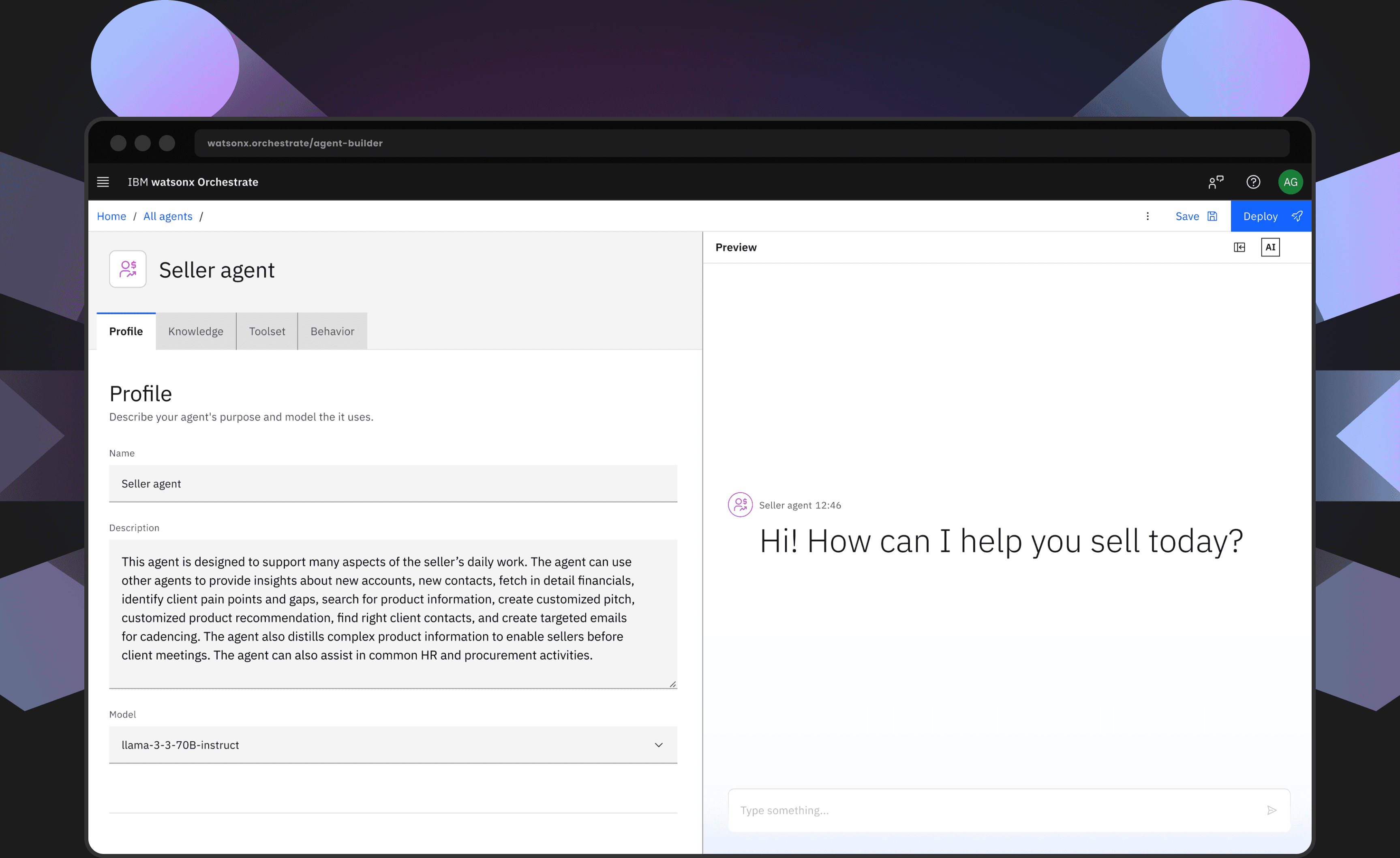
Four tabs: Profile, Knowledge, Toolset, Behavior.
Free navigation. Scroll-based progression. Configure pieces that interact dynamically—matching how agents actually work.
I killed the cool thing to save the outcome.
The Transformation
From seven entry points to one. From weeks to configure to minutes to deploy
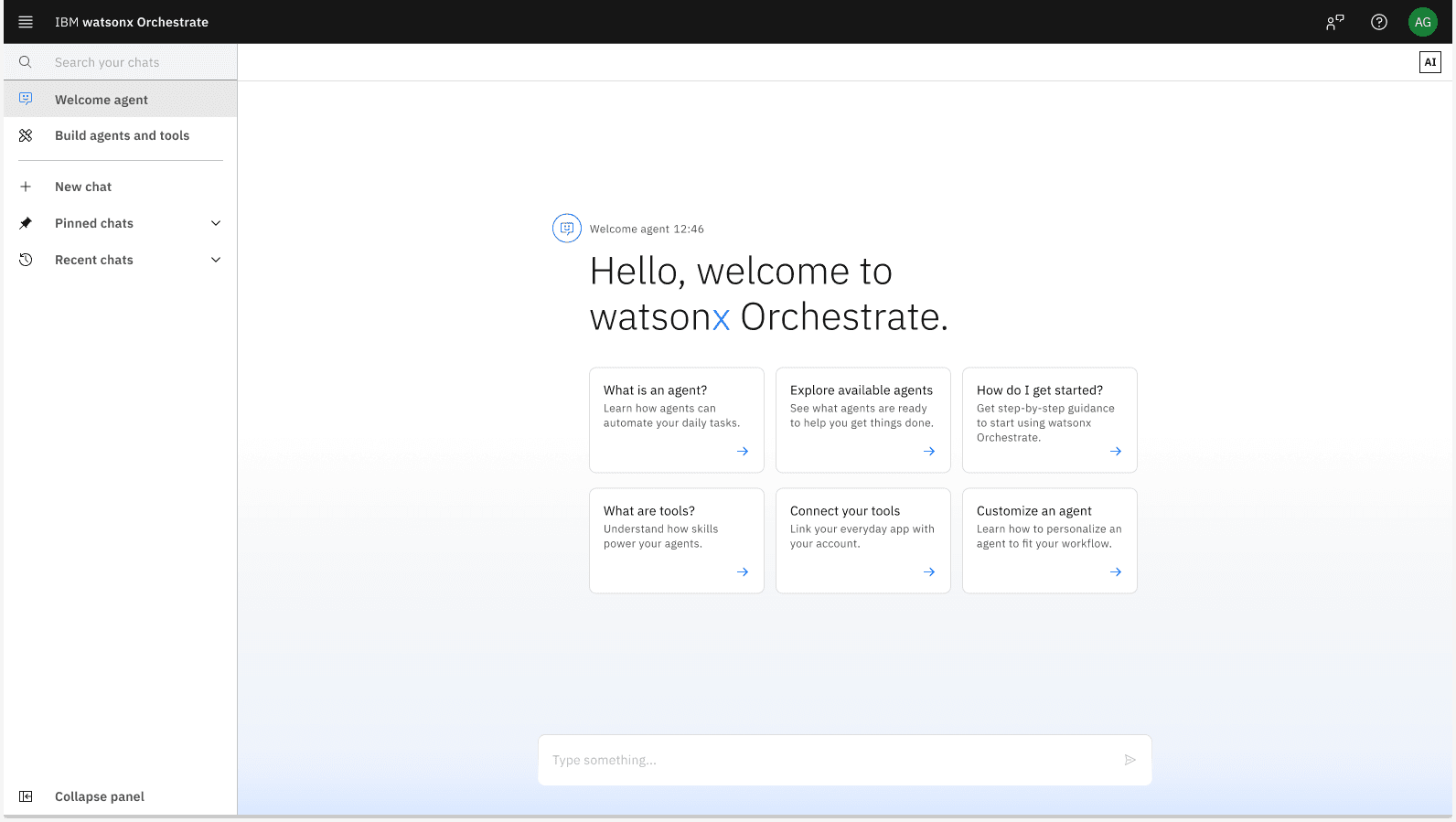
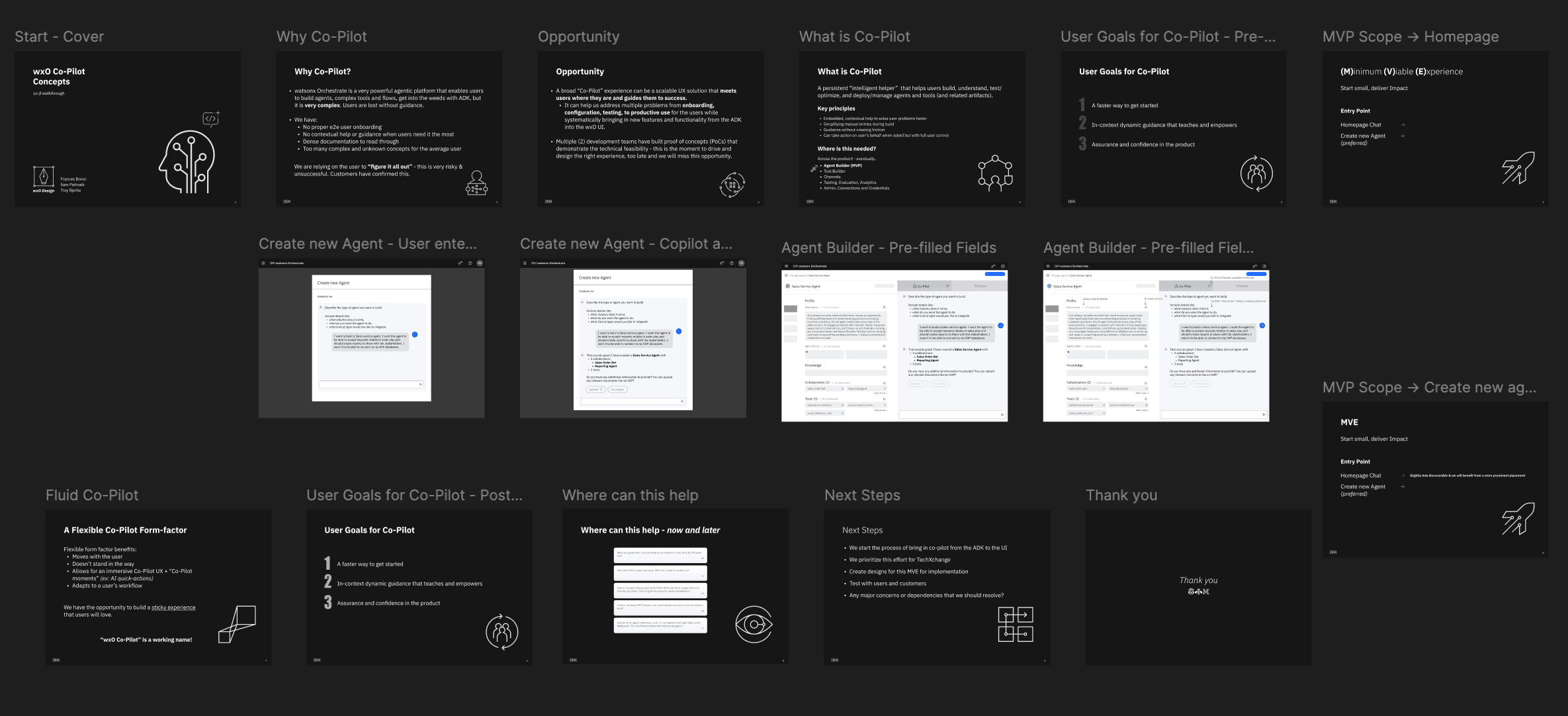
New watsonx Orchestrate homepage with a very familiar chat interface that also helps onboard a new user & guides them towards building
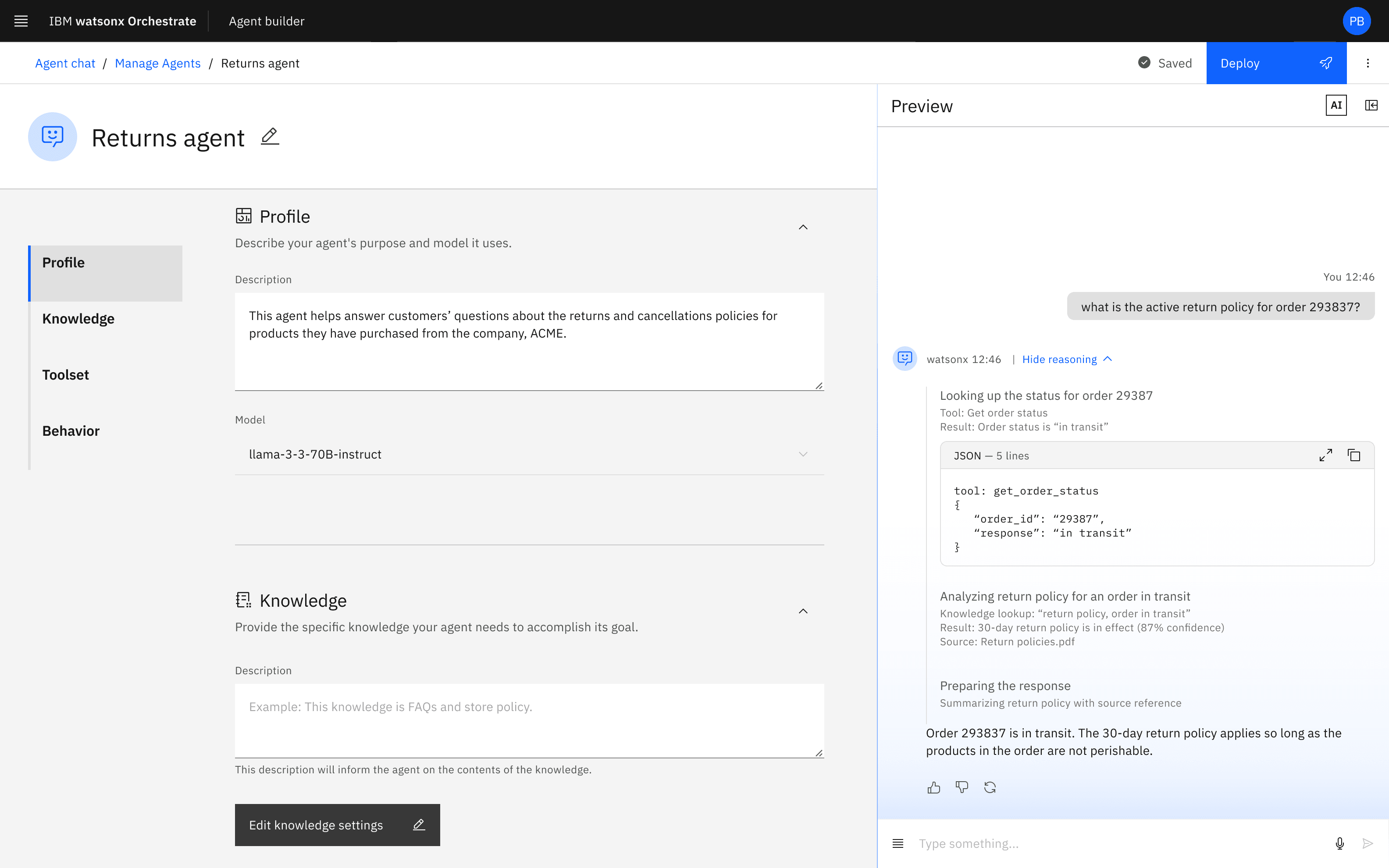
A true no-code, intuitively guided AI agent builder experience that we pioneered
Design Principles
The Solution
One builder experience. Agentic platform from the ground up
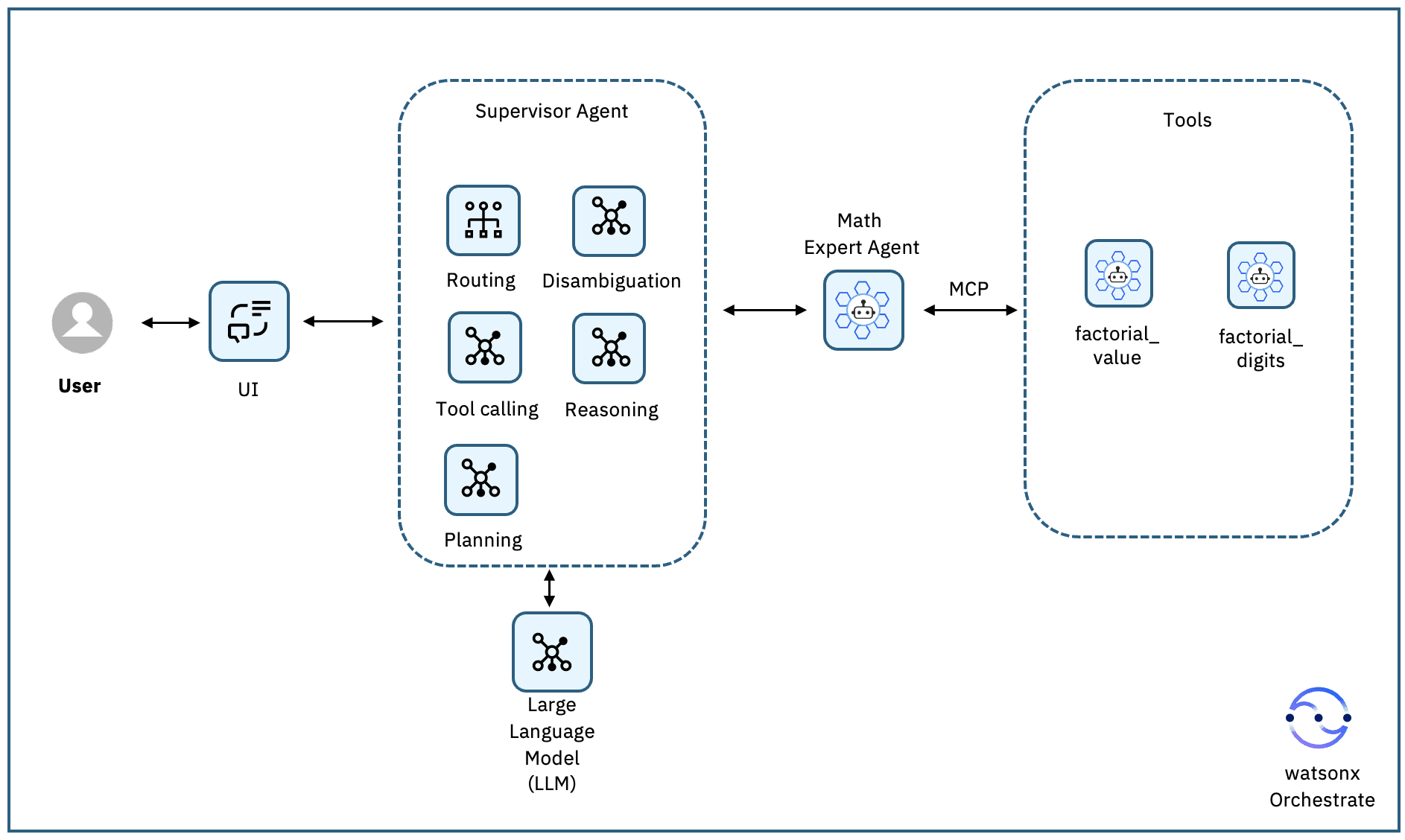
I partnered with product leadership to reimagine watsonx Orchestrate from first principles—building a truly no-code agentic platform on LangGraph. Instead of seven entry points, we created one. Instead of weeks to configure, we designed for <10 minutes to deploy. My role extended beyond UI: I drove alignment across product, engineering, and business while personally designing the core experiences.
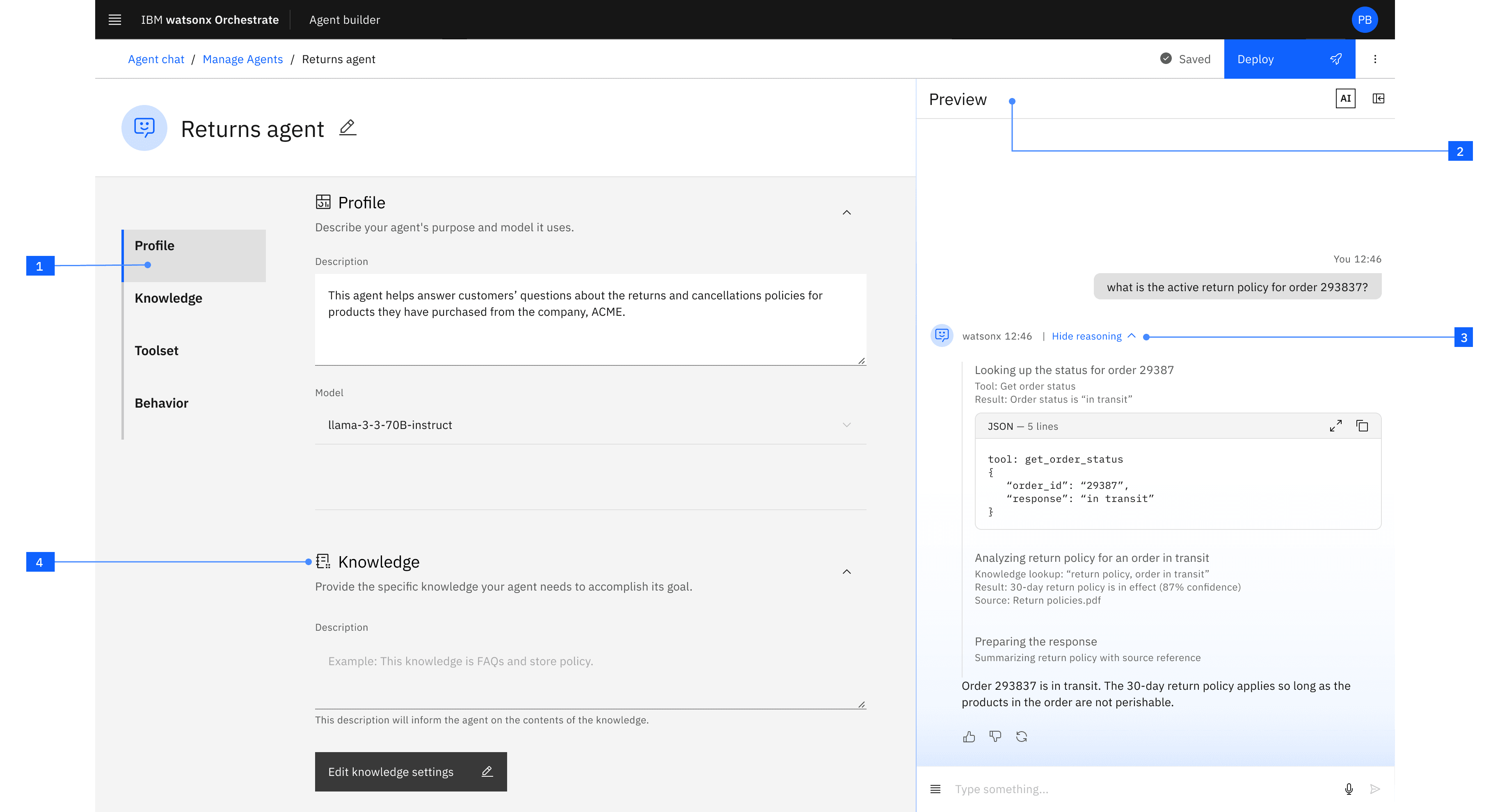
Four principles, one screen.
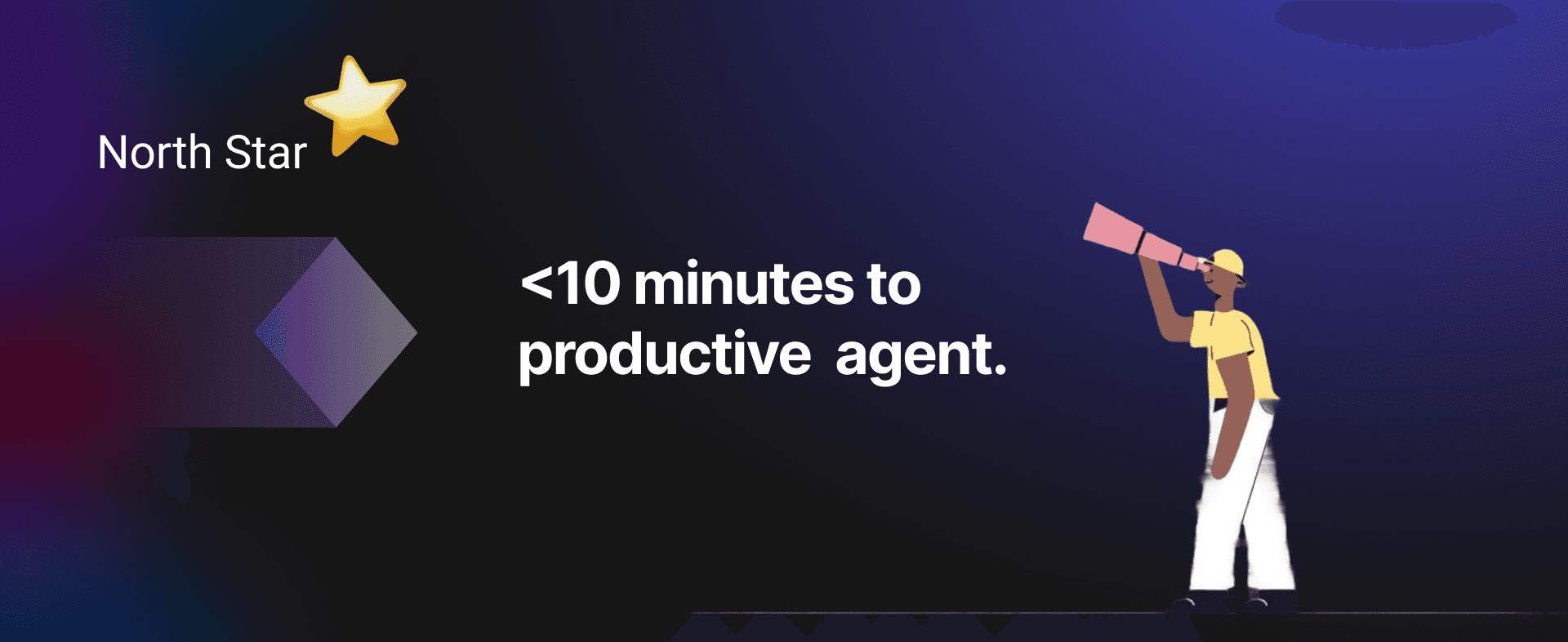
Below, see how each of the four design principles came to life—all in service of one North Star: <10 minutes to productive agent.
Guided without Force
The 4-tab structure guides users naturally—Profile, Knowledge, Toolset, Behavior. Instead of rigid steps, users scroll through tabs filling out sections as they go. Before they realize it, they've built a complete agent. No manual. No training videos. Just intuitive progression that aligns with the underlying agent architecture.
Design Decision: Intuitive Flow, Zero Training
Auto-scrolling page anchors instead of forced step-by-step wizards. Builders maintain control while getting clear direction and are not exposed to the underlying complex technical architecture.
See What You're Building
"Seeing is believing" drove a core layout decision: I wanted the preview chat to occupy 50% of the screen, equal to the builder itself. Every change instantly reflects in the preview. Builders test as they build, eliminating surprises at deployment.
Design Decision: Real-Time Preview
Live preview on right, builder on left—not hidden in a separate tab or modal. Constant feedback loop builds confidence.
Trust Through Transparency
Enterprise users need to understand how agents make decisions. I wanted the interface to expose reasoning traces, data sources, decision paths, and guidelines enforcement—making AI logic comprehensible to non-technical users. No black boxes.
Guidelines give builders full control over agent behavior—preventing off-topic responses and enforcing compliance rules. Reasoning traces show exactly what the agent did: which guidelines it followed, which tools it invoked, and what data it used. End users see simplified responses; builders see complete execution details.
Design Decision: Trust Through Transparency & Control
Detailed reasoning traces + guidelines system. Expandable reasoning steps in preview chat showing tool invocations, input/output, and guideline enforcement. Critical for governance, compliance, and builder confidence.
Open Yet Secure
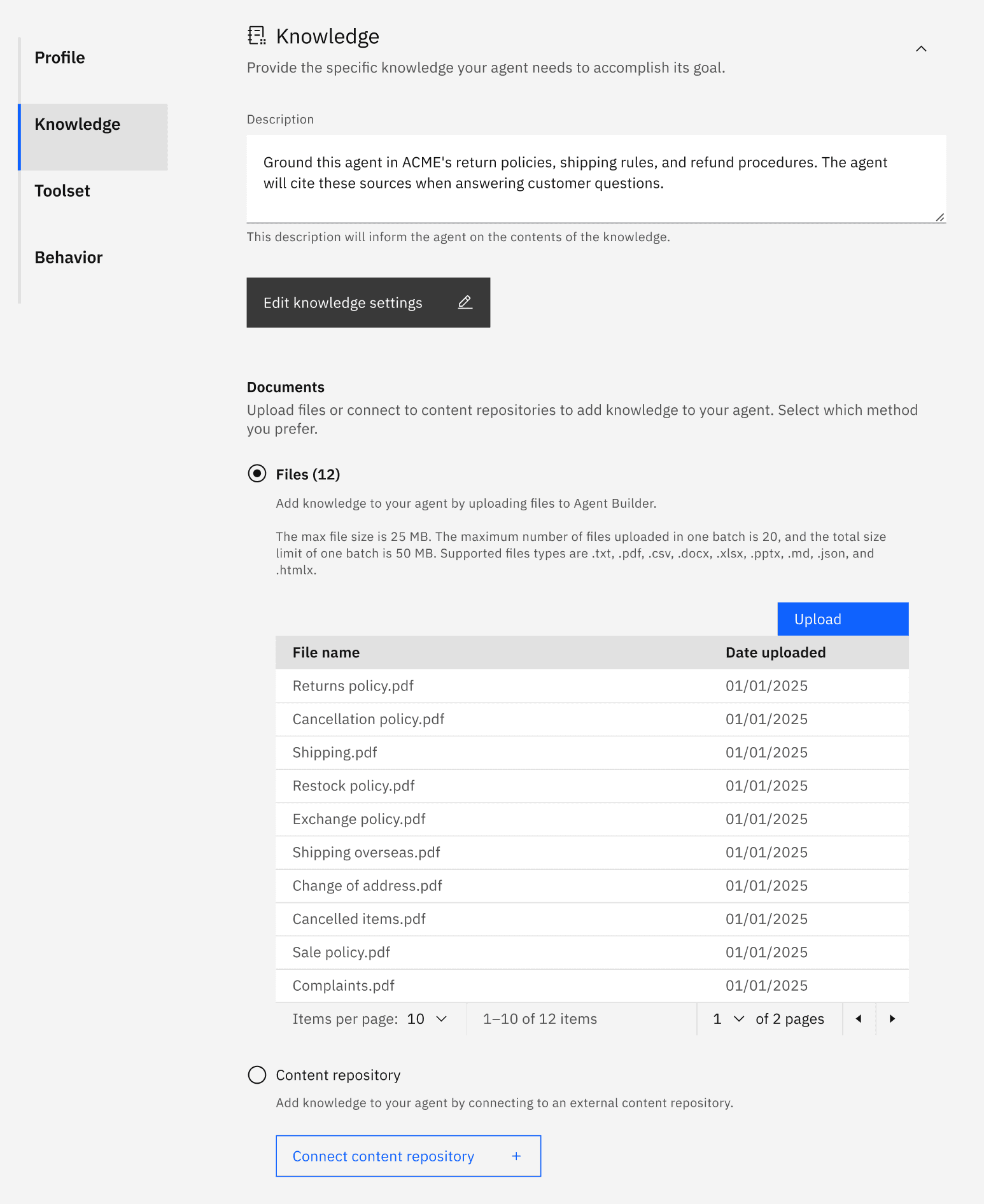
Customers want agents grounded in their company data while connecting to external systems. Knowledge integration is a core tab—upload and preview in seconds. I built import patterns to bridge UI and code, letting external agents and tools integrate seamlessly. Privacy-first, yet fundamentally collaborative and open for future scale.
Design Decision: Open Architecture with Private Context
Knowledge as core tab, not advanced feature. Import patterns supporting external agents (Langflow, A2A, MCP). Enterprise privacy without sacrificing extensibility.
See It In Action
Agent Builder Demo: Watch me build a "Cat Facts" Agent under 4 mins demonstrating guided build, knowledge grounding, realtime testing & guardrails in action.
The Impact
We shipped in July 2025. The numbers told the story.
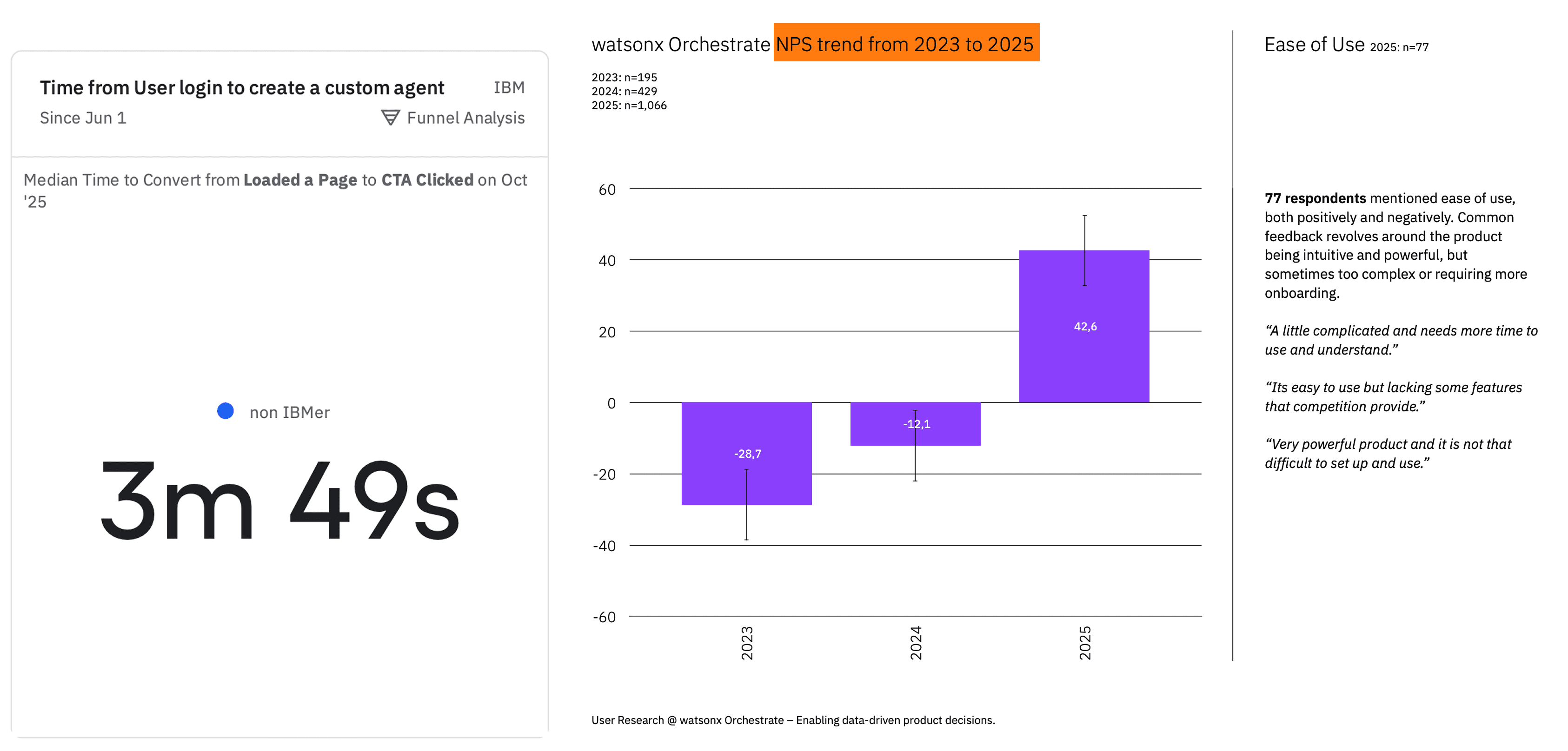
Average build time is 3m 49s, 62% under our goal (<10 min)
Improved NPS by 71 points, from -28.7 in 2023 to +42.6 in 2025
What the data showed
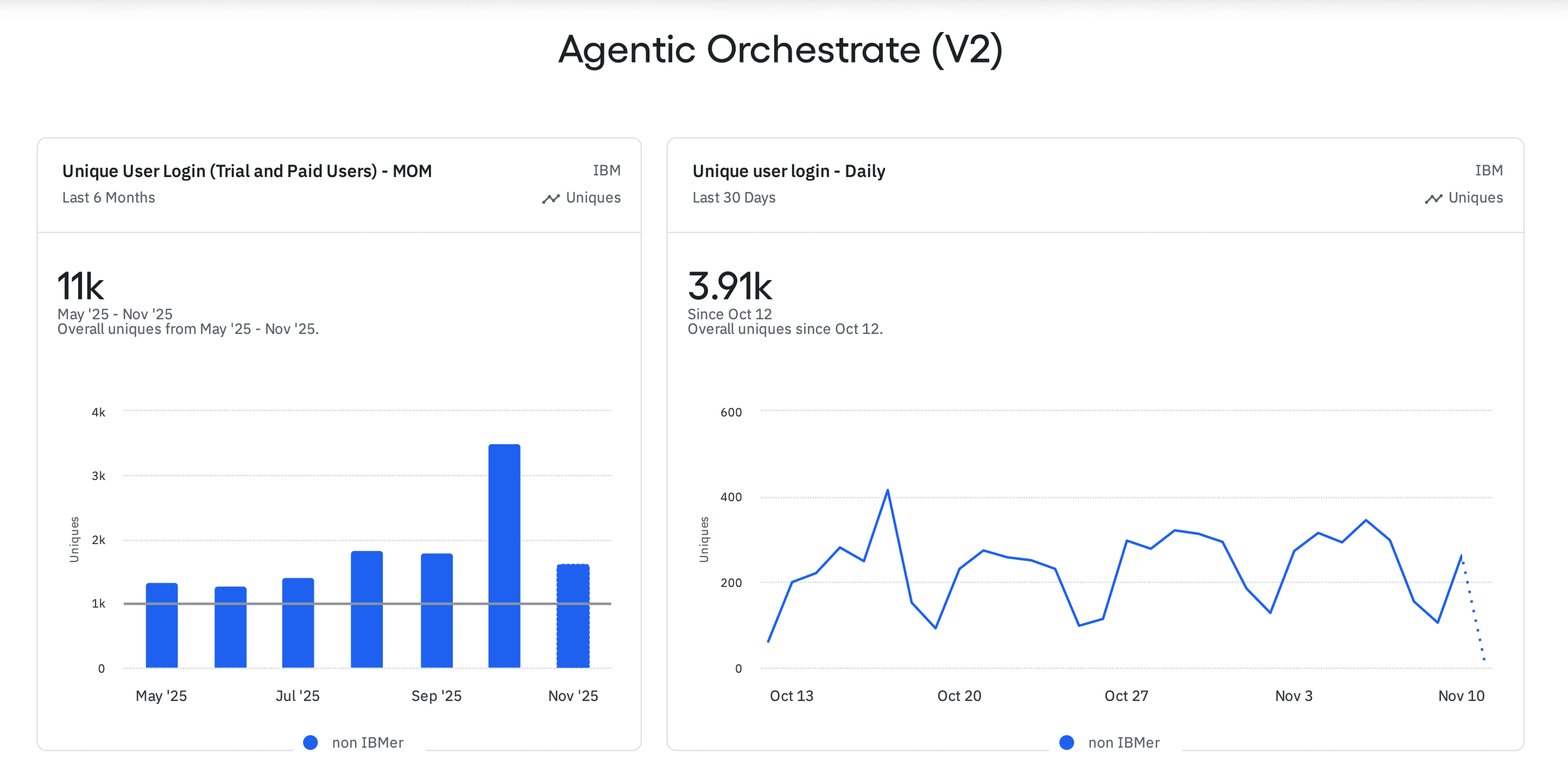
11K unique users over 6 months
Daily active users steady at 200-400
30+ enterprise customers deployed
What users told us
"Easy to use but lacking some features"
Model selection still confusing
Deployment failures surfaced too late
Wanted more 3rd-party integrations
Business & Product Impact
$150M
recognized revenue in Q3 2025
$300M-$500M
at-risk accounts retained
30+
enterprise customers deployed
8K
monthly active users building agents
<4 min
average agent creation time-to-value
75%
reduction in visual/UX bugs
40%
faster dev cycles
Customer Outcomes
The platform now powers enterprise AI across Fortune 500 companies—from HR automation to procurement to customer care. Client feedback consistently cited the intuitive experience, flexibility, and reliability as key value drivers.
IBM HR (AskHR)
94% of 10M+ annual inquiries resolved, >1M HR transactions processed
Dun & Bradstreet
360° risk supplier assessments, 10-20% Estimated reduction in time for procurement tasks
Lockheed Martin
Agentic AI ecosystem for 10,000 engineers—replaced 46 tools with one platform
Wimbledon
16M fan interactions with 'Match Chat' agent — processed 2.7M data points
" height="29.407525189397163px" id="HCJBI2728" transform="translate(0 5.5)" width="82.2000018434499px"/><path d="M 21.3 12.214 C 23 13.914 23.9 16.214 23.8 18.714 C 23.8 21.114 22.8 23.414 21 25.114 L 20.7 25.414 L 18.3 22.914 L 18.6 22.614 C 19.7 21.614 20.3 20.214 20.3 18.714 C 20.3 17.214 19.8 15.814 18.7 14.714 C 18.1 14.114 17.5 13.614 16.7 13.314 L 16.7 9.614 C 18.5 10.014 20.1 10.914 21.3 12.214 M 1.7 2.114 L 0 3.814 L 2.4 6.314 L 4.1 4.714 C 5.8 3.114 8.4 3.114 10 4.814 C 11.6 6.514 11.6 9.114 9.9 10.714 L 8.2 12.314 L 10.6 14.814 L 12.3 13.214 C 15.4 10.314 15.4 5.414 12.5 2.314 C 9.6 -0.686 4.8 -0.786 1.7 2.114 M 96.7 27.014 C 97.6 28.714 99.6 30.214 102.6 30.214 C 106.1 30.214 107.6 28.414 107.6 26.114 C 107.6 23.414 105.4 22.514 103 21.914 C 100.6 21.214 99.7 20.814 99.7 19.514 C 99.7 18.414 100.6 17.714 102.1 17.714 C 103.4 17.714 104.4 18.314 105.1 19.314 L 106.7 18.114 C 105.7 16.714 104.2 15.914 102.1 15.914 C 99.6 15.914 97.6 17.314 97.6 19.714 C 97.6 22.314 99.6 23.214 101.8 23.814 C 104.2 24.514 105.4 24.814 105.4 26.314 C 105.4 27.614 104.3 28.414 102.5 28.414 C 100.5 28.414 99.3 27.414 98.5 26.114 L 96.7 27.014 M 113.5 25.714 C 113.5 29.014 115.1 30.214 117.2 30.214 C 118.9 30.214 120 29.514 120.6 28.814 L 119.3 27.314 C 118.9 27.714 118.4 28.114 117.4 28.114 C 116.4 28.114 115.8 27.514 115.8 25.714 L 115.8 18.014 L 119.7 18.014 L 119.7 16.014 L 115.8 16.014 L 115.8 6.314 L 113.5 6.314 L 113.5 16.114 L 111.4 16.114 L 111.4 18.114 L 113.5 18.114 L 113.5 25.714 M 125.4 29.914 L 127.7 29.914 L 127.7 22.614 C 127.7 19.414 129.3 18.014 131.3 18.014 C 132.2 18.014 132.8 18.214 133.2 18.514 L 134.1 16.514 C 133.5 16.114 132.7 15.814 131.7 15.814 C 130.1 15.814 128.5 16.314 127.7 18.414 L 127.8 16.014 L 125.5 16.014 L 125.5 29.914 Z M 147.8 22.014 C 147.6 19.614 146.1 17.814 143.2 17.814 C 140.6 17.814 138.8 19.514 138.4 22.014 Z M 143.5 28.214 C 145.6 28.214 147 27.414 147.9 26.414 L 149.3 27.814 C 148 29.214 146.2 30.214 143.5 30.214 C 139 30.214 136 27.114 136 23.014 C 136 19.014 139.1 15.814 143.1 15.814 C 147.5 15.814 150.2 19.214 150 23.814 L 138.2 23.814 C 138.7 26.414 140.5 28.214 143.5 28.214 M 165.8 22.014 C 165.6 19.614 164.1 17.814 161.2 17.814 C 158.6 17.814 156.8 19.514 156.4 22.014 Z M 161.6 28.214 C 163.7 28.214 165.1 27.414 166 26.414 L 167.4 27.814 C 166.1 29.214 164.3 30.214 161.6 30.214 C 157.1 30.214 154.1 27.114 154.1 23.014 C 154.1 19.014 157.2 15.814 161.2 15.814 C 165.6 15.814 168.3 19.214 168.1 23.814 L 156.3 23.814 C 156.7 26.414 158.5 28.214 161.6 28.214 M 174 25.714 C 174 29.014 175.6 30.214 177.7 30.214 C 179.4 30.214 180.5 29.514 181.1 28.814 L 179.8 27.314 C 179.4 27.714 178.9 28.114 177.9 28.114 C 176.9 28.114 176.3 27.514 176.3 25.714 L 176.3 18.014 L 180.2 18.014 L 180.2 16.014 L 176.3 16.014 L 176.3 6.314 L 174 6.314 L 174 16.114 L 171.9 16.114 L 171.9 18.114 L 174 18.114 L 174 25.714 M 39.1 15.814 C 36.5 15.814 34.8 16.814 33.8 18.614 L 33.8 6.314 L 31.5 6.314 L 31.5 29.914 L 33.8 29.914 L 33.8 27.414 C 34.8 29.214 36.7 30.214 39.1 30.214 C 42.9 30.214 45.8 27.114 45.8 23.014 C 45.8 18.814 42.9 15.814 39.1 15.814 Z M 38.6 28.114 C 35.7 28.114 33.7 25.914 33.7 22.914 C 33.7 19.914 35.7 17.814 38.6 17.814 C 41.5 17.814 43.4 19.914 43.4 22.914 C 43.4 25.914 41.5 28.114 38.6 28.114 Z M 53 18.314 L 53 16.114 L 50.6 16.114 L 50.6 29.914 L 52.9 29.914 L 52.9 22.614 C 52.9 19.414 54.5 18.014 56.5 18.014 C 57.4 18.014 58 18.214 58.4 18.514 L 59.3 16.514 C 58.7 16.114 57.9 15.814 56.9 15.814 C 55.4 15.814 53.9 16.314 53 18.314 Z M 68 15.814 C 65.4 15.814 63.6 16.814 62.4 18.514 L 63.8 19.814 C 64.7 18.614 65.9 17.814 67.8 17.814 C 69.8 17.814 71 18.814 71 21.514 L 71 21.814 L 66.7 21.814 C 63.8 21.814 61.5 23.114 61.5 26.014 C 61.5 28.914 63.6 30.214 66.6 30.214 C 68.7 30.214 70.1 29.614 71.1 28.314 L 71.1 29.914 L 73.3 29.914 L 73.3 21.414 C 73.2 17.614 71.1 15.814 68 15.814 Z M 71.1 25.314 C 71.1 27.114 69.3 28.314 67.2 28.314 C 65 28.314 63.9 27.514 63.9 25.914 C 63.9 24.214 65.3 23.614 67 23.614 L 71.1 23.614 Z M 89.9 6.314 L 89.9 18.614 C 88.9 16.814 87.2 15.814 84.6 15.814 C 80.9 15.814 77.9 18.914 77.9 23.014 C 77.9 27.114 80.8 30.214 84.6 30.214 C 87 30.214 88.9 29.214 89.9 27.414 L 89.9 29.914 L 92.2 29.914 L 92.2 6.314 Z M 85 28.114 C 82.1 28.114 80.2 25.914 80.2 22.914 C 80.2 19.914 82.1 17.814 85 17.814 C 87.9 17.814 89.9 19.914 89.9 22.914 C 90 25.914 88 28.114 85 28.114 Z M 127 19.714 L 127.8 19.714 L 127.8 16.014 L 127 16.014 Z" fill="rgb(48, 149, 180)" height="30.213930034637457px" id="osBHGji1k" transform="translate(59 0)" width="181.0999938964844px"/></g></svg>)





These insights drove our next improvements.
Principle-Guided Improvements
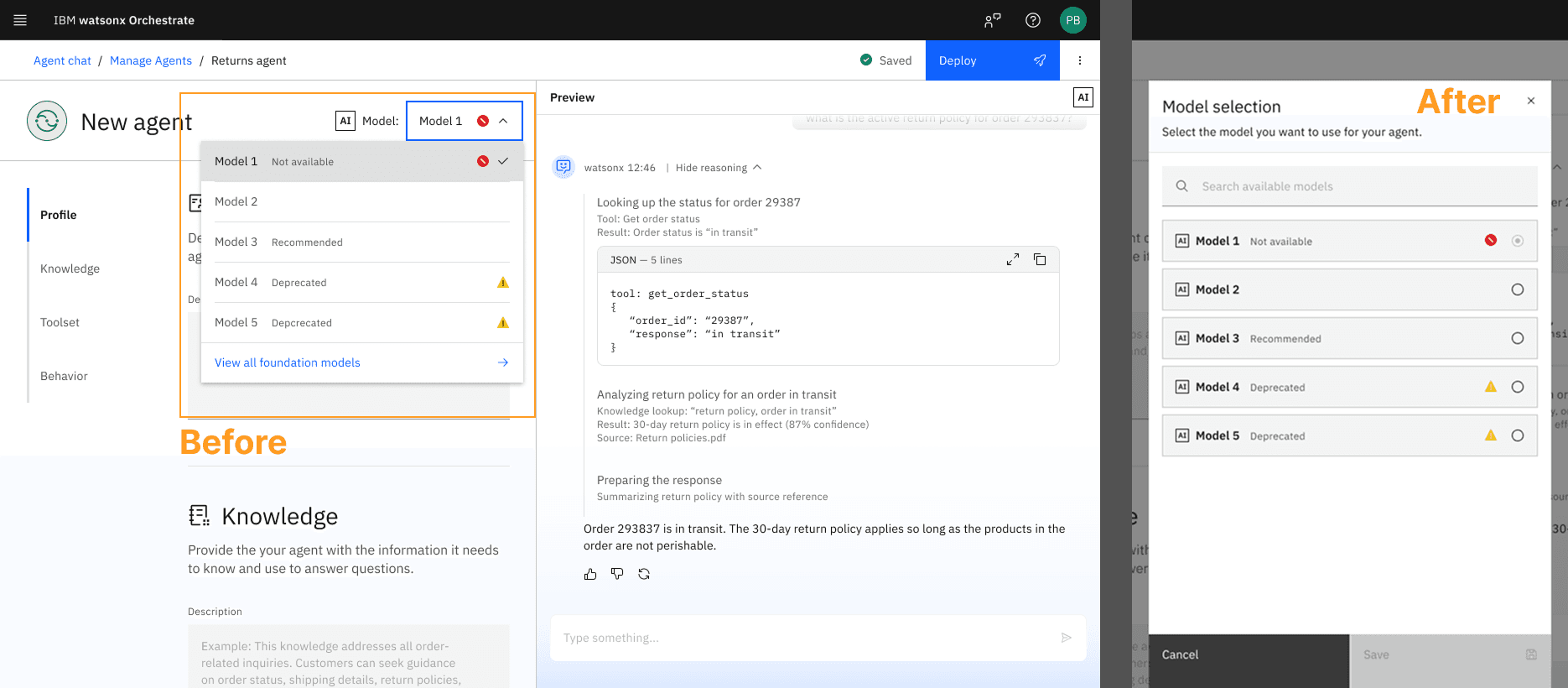
1. Transparency: Model Selection
Users struggled understanding model differences—cost, deprecation, performance impact hidden behind tooltips. I designed a detailed modal with plain-language descriptions, pricing, and status indicators.
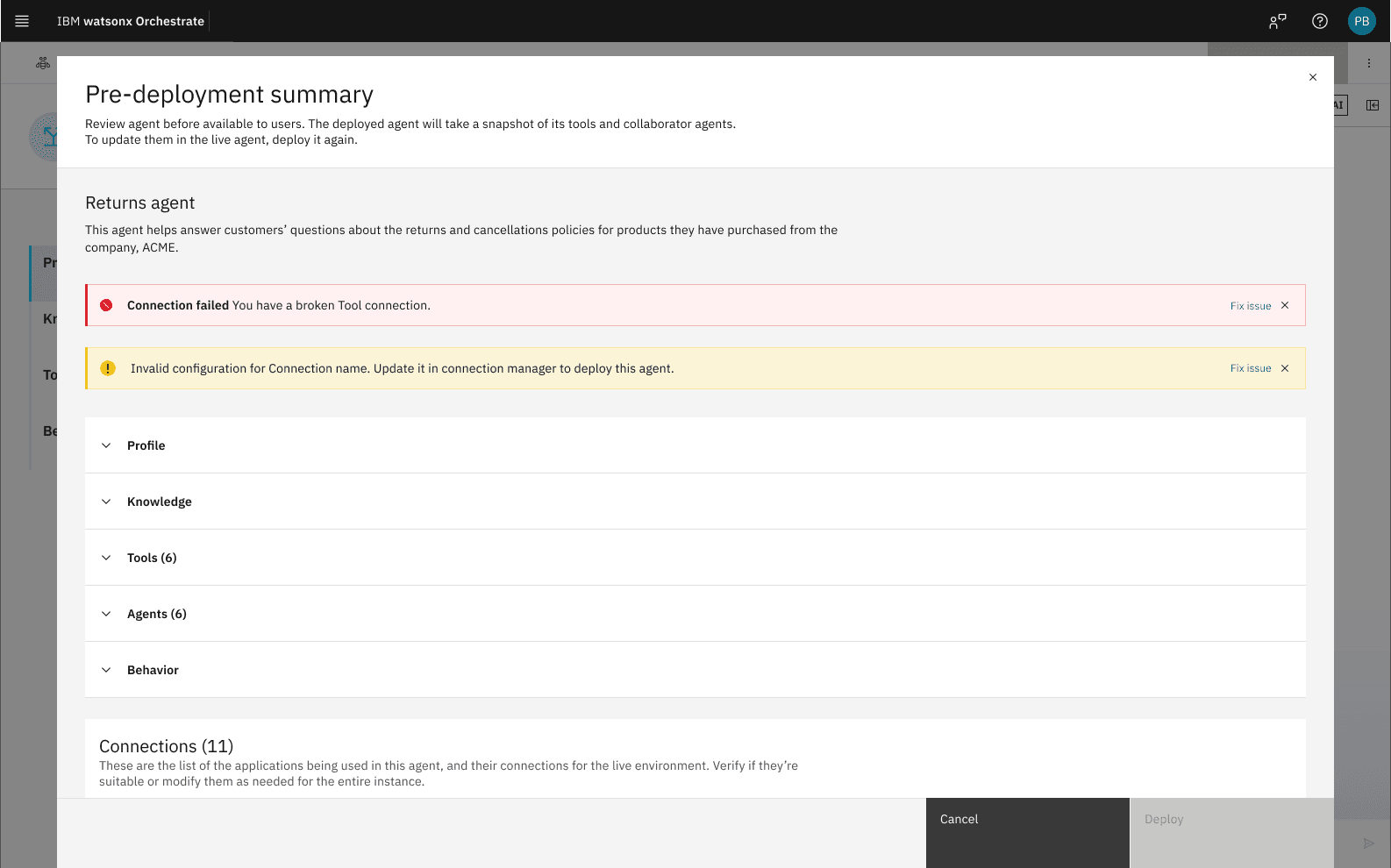
Trust: Deployment Summary
Users deployed blind—no way to verify agents would work. I designed a pre-deployment summary showing configuration details, connection status, and errors. Users fix issues before deploying, ensuring success.
Open and Scalable: Dynamic Import Pattern
Dev and runtime teams wanted external connections (A2A, Langflow, MCP, custom APIs), but each had different credentials and config. Adding individual tabs would've created many tabs—chaos.
I designed categorized selection with dynamic forms that load the right fields per connection type.
Impact: Scalable pattern that accommodates future integrations without UI bloat.
Guided Without Force: IA Strategy
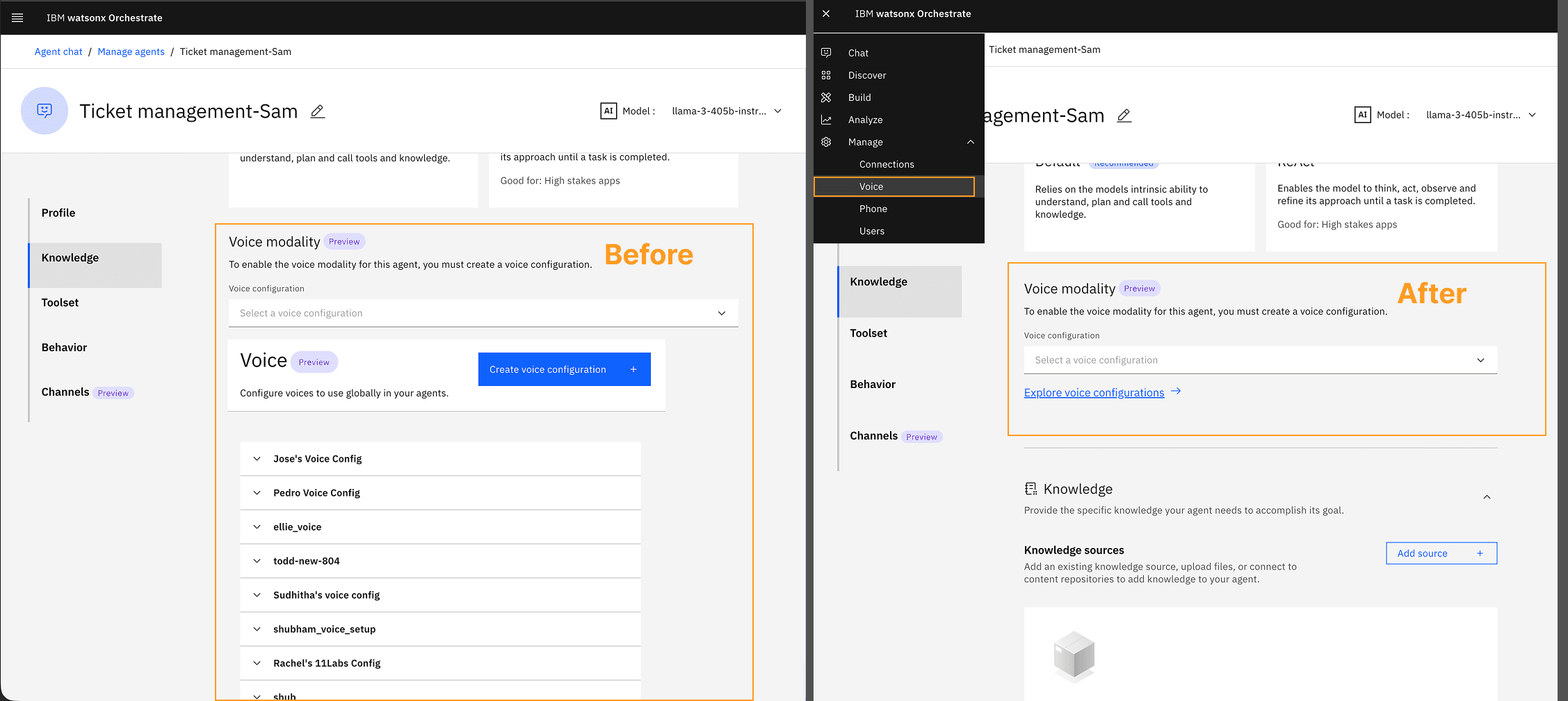
As UX owner, I pushed back on Voice and Channels teams wanting to add features directly in builder—would've killed our <4 min goal.
I introduced "Manage" as a new top-level IA section for advanced configs. Kept builder focused on core creation flow.
Impact: Maintained <4 min build time, removed clutter, scalable for future
Governance: Agent Analytics
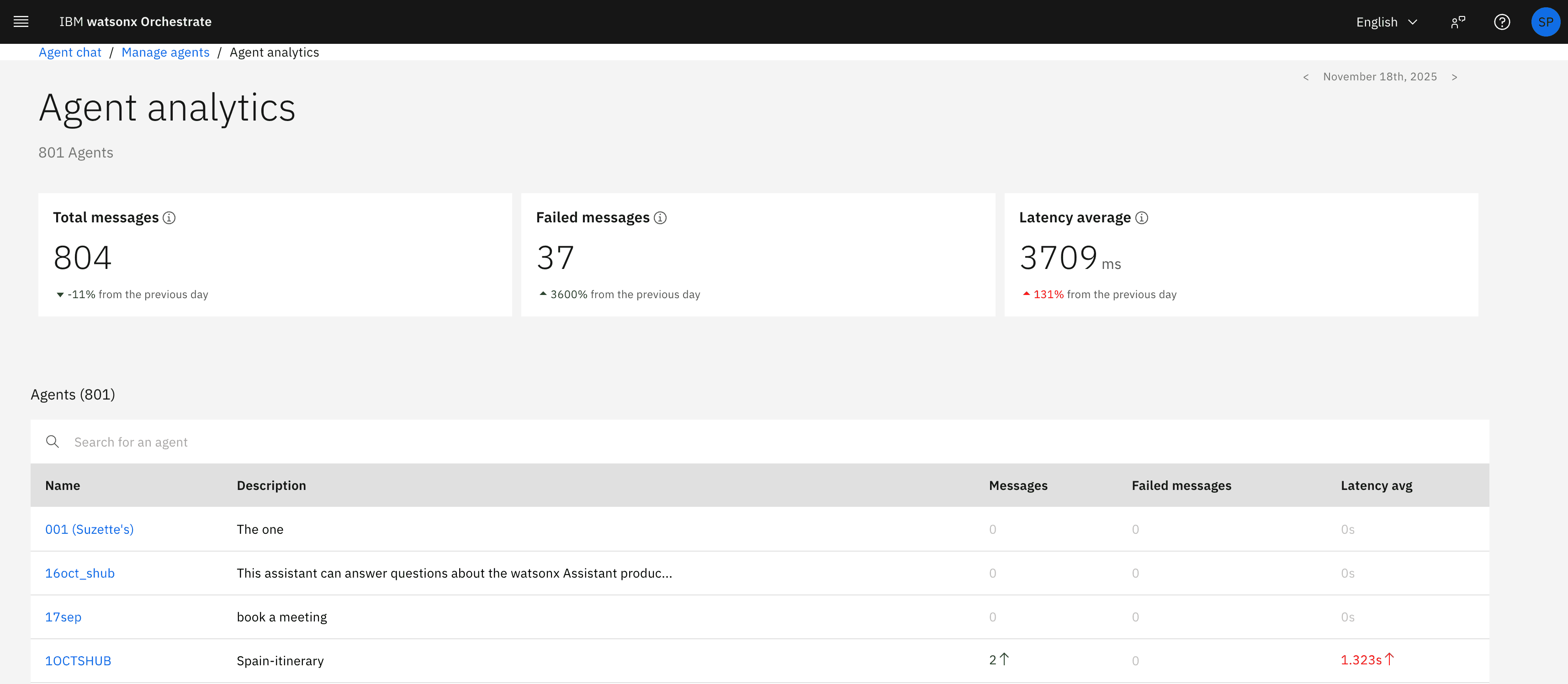
Post-deployment monitoring was a top customer request. We designed analytics dashboard showing usage, success rates, tool invocations at a tenant level as well as individual agent level including accessing traces for maximum governance and control. Users could confidently monitor their agents post deployment and identify issues as soon as they occur.
What's Next
2026 Vision - Canvas Builder & AI Assisted Agent Builder
I led both these initiatives based on customer requests and competitive analysis as well as earlier explorations. Pitched to leadership, the benefits of relationship visualization and AI-assisted agent generation.
Currently in development for release in 2026.